Google's AI Mode in the UK: what it means for your local business
AI Mode answers long, fussy questions and can now book restaurant tables in the UK. How it picks which businesses to show, and what to check on yours.
· 6 min read
By the Blessed Pixels team
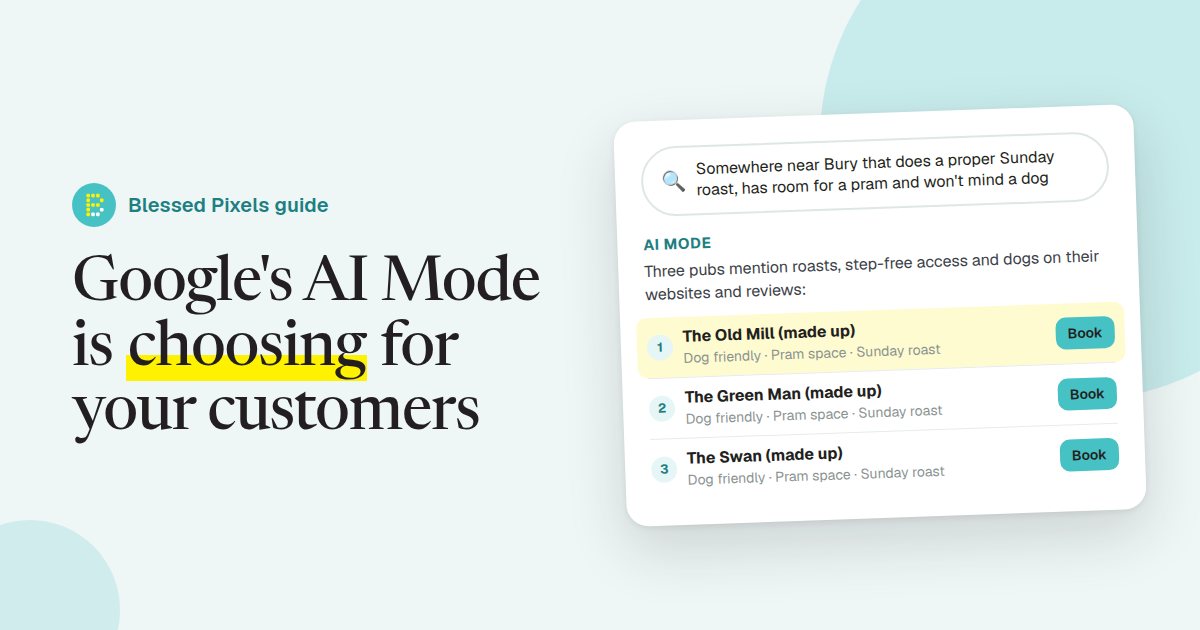
Plenty of people still type "Sunday roast Bury St Edmunds" into Google. But Google has built something for the other kind of question, the kind that sounds more like a text to a friend:
Somewhere near Bury that does a proper Sunday roast, has room for a pram, and won't mind a dog.
Three conditions in one breath, and whoever's asking wants an answer, not ten links to wade through. That's the job of Google's AI Mode. If you run a local business, it changes what being found on Google involves, though most of what helps is still in your hands and costs nothing but an evening. If you'd like a baseline before reading on, run your site through our free AI check.
What AI Mode actually is
Google Search now has two AI features, and they get muddled.
AI Overviews are the short AI summaries that sometimes sit at the top of ordinary results. You've probably scrolled past a few today.
AI Mode is a separate tab. You ask a question, it writes a fuller answer with links, and you can carry on asking follow-ups as if you were chatting. Google launched AI Mode in the UK in July 2025.
For a local business, the difference is this. People ask AI Mode longer, more particular questions, and it answers with a small handful of businesses rather than a page of results. The shortlist is short. Whether you'd make it depends on how well Google's systems can read your business, which is what our full AI audit is built around.
It books tables now, too
In April 2026 Google added restaurant booking to AI Mode in the UK. Ask for a table for four on Friday somewhere with outdoor seating, and AI Mode looks across booking platforms for real availability and sends you straight through to book.
If you run a restaurant, café or pub, sit with that for a second. The customer may never open your website. They choose from what Google shows them, tap, and they're booked.
Restaurants came first. At its I/O conference in May 2026, Google talked about AI agents doing more tasks inside Search. We wouldn't bet against the same ask, compare, book pattern spreading to other kinds of business, though Google hasn't said which or when.
If you take bookings, check two things: that your booking system is one Google works with, and that it's connected to your Google Business Profile. Not sure? Email your booking provider's support team; they'll know, and it's a two-line email. Booking links are on our list of areas we check for exactly this reason.
How AI Mode decides who to show
Google's guidance on AI features and your website is refreshingly plain. There's no special trick or extra markup needed to appear in AI Overviews or AI Mode. What makes a site good for normal search applies here as well.
For a local business, that boils down to where Google can read about you. Your Google Business Profile comes first: categories, hours, services, photos, attributes, reviews. Then your own website, saying what you do, where, for whom, and answering the obvious questions. Then everything else written about you, from directory listings to the local paper.
Go back to the Sunday roast. Pram space and dogs are the whole question, and they only count if they're written down somewhere Google can read. A pub that's lovely with dogs but never says so online simply doesn't exist for that search. It's an easy thing to overlook, because to the people who work there it's too obvious to mention. The free check catches the technical side of this, such as details stuck inside images; spotting the missing facts is a job for a person.
Five things worth checking this month
None of them cost money.
Fill in every attribute on your Google Business Profile. Wheelchair access, outdoor seating, dog friendly, free Wi-Fi, card payments: those little tick boxes are tedious, and they're exactly what long AI Mode questions are made of. You manage them at Google Business Profile.
Get your opening hours right everywhere, bank holidays and Christmas included. Turning up to a locked door is the fastest way to lose a customer, and wrong hours give AI tools a reason to doubt everything else you've said.
Answer the fussy questions on your website. Is there parking? Can you do gluten-free? Do you cover Stowmarket? A plain list of questions and answers does more here than a beautiful home page, and our own FAQ page shows the format.
Ask for detailed reviews. "Great service" helps a little. "They fitted us in on a Saturday and the kids loved the play corner" helps far more, because it answers something the next customer will ask. You can ask people to mention what they liked; you can't write reviews for them, and fake reviews are illegal in the UK.
Make sure your website can actually be read. Hours inside a photo, a menu that's only a PDF, a site that blocks Google's crawlers by mistake: each one leaves AI Mode with less to go on. We followed a crawler round a made-up bakery's site in what an AI crawler sees if you want to see how that plays out.
Will AI Mode cut my website traffic?
Possibly, for some questions. If AI Mode tells someone straight away what time the Abbey Gardens café closes, they've no reason to click.
Think about who still arrives, though. Someone who reaches you through an AI Mode answer has usually compared you with the alternatives already and picked you. They're ringing, booking or turning up. For most businesses that's worth more than a casual click from someone who was only checking the hours.
So we'd worry less about the clicks and more about whether you appear on the shortlist at all. If your current website makes that hard to fix, a rebuild may be the cheaper route in the long run, and our website plans start small with all of this included from day one.
Frequently asked questions
Is AI Mode the same as AI Overviews?
No. AI Overviews are short summaries at the top of normal Google results. AI Mode is a separate tab where you have a back-and-forth conversation with Google's AI, and it gives longer answers with links.
Can I pay to appear in AI Mode?
Not in the answer itself. Google does show adverts around its AI features in some places, but they're labelled as ads. Appearing in the AI-written answer depends on the information Google can find about you.
Does my business need special code to appear in AI Mode?
Google says no special markup is needed for its AI features. Structured data still helps Google understand your details, such as your address, hours and type of business, so it's worth having.
My restaurant uses a booking system. Will it work with AI Mode?
AI Mode books through partner booking platforms, not directly through your website. Ask your booking provider whether they work with Google, and check the booking link on your Google Business Profile works.
How do I see what AI Mode says about my business?
Open Google, choose AI Mode and ask the questions your customers would ask, in full sentences. Try a few versions and different times of day, because answers change. Note what's missing or wrong, then fix it at the source.