What an AI crawler sees when it visits your website
A walk through a made-up bakery website from an AI crawler's point of view, showing what gets read, what gets missed and the simple fixes for each.
· 6 min read
By the Blessed Pixels team
Your website gets two sorts of visitor, and you've only ever designed for one of them.
The first is a person. They notice the photos, the colours, the font you paid extra for. They scroll, tap, and squint at the menu on a small screen.
The second is a crawler: software sent by Google, ChatGPT, Perplexity and the rest to read your site so their AI can talk about you later. It doesn't care about the colours or the photos. It reads text, follows links and leaves, usually within seconds.
So let's follow one round. The bakery is made up (we'll call it Crumb & Co, on a made-up morning) but nothing that goes wrong there is exotic. These are ordinary problems, and every one of them is easy to have without knowing. If you'd rather test your own site than read about a fictional one, our free AI website check does a version of this walk in under a minute.
7:02am. The front door: robots.txt
Before a well-behaved crawler reads anything, it checks a small file called robots.txt at the root of the website. Think of it as the notice on the door: who's allowed in, and which rooms are off limits.
Crumb & Co's file has a line a web designer added years ago to "stop spam bots":
User-agent: GPTBot
Disallow: /
That shuts the door on one of OpenAI's crawlers. OpenAI runs a separate one for ChatGPT's search answers, called OAI-SearchBot, and both are listed on its crawler documentation page. Letting each one in or keeping it out is a fair choice, and some businesses block training crawlers on purpose. The trouble starts when nobody chose at all, and the owner has no idea the line is there.
Open your own: your web address followed by /robots.txt. Look for AI crawler names next to Disallow: /. If you didn't decide to block them, ask whoever looks after your site to take the lines out. Which crawlers are worth letting in, and what each is for, is covered in our full AI audit.
7:02am and one second. The home page, minus the clever bits
In it goes. It asks for the home page.
Many owners don't realise that a lot of AI crawlers read a page exactly as it first arrives, without running the JavaScript that builds parts of modern websites. Vercel looked into this in The rise of the AI crawler and found that several major AI crawlers, including OpenAI's and Anthropic's, weren't running JavaScript when it checked. Google's crawlers are the main exception.
Crumb & Co's menu, prices and opening hours are loaded by a script a moment after the page appears. A person never notices the delay. The crawler gets an empty box where the menu should be.
The test is one question for your web person: "If JavaScript is switched off, is our main text still there?" If not, the important details need to be written into the page itself. That's a job we take on (it's on our what we fix page), but any decent developer can do it.
7:02am and two seconds. Reading what's there
What the crawler can read, it reads closely.
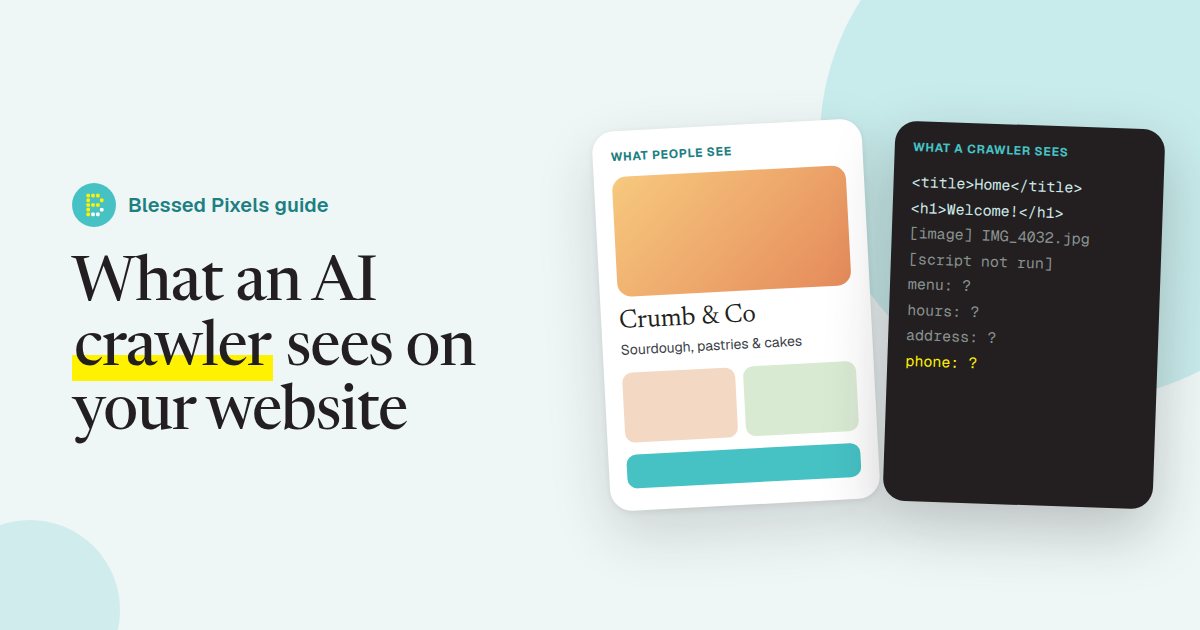
The page title is "Home". Not "Crumb & Co, artisan bakery in Bury St Edmunds". Just "Home", like a great many other websites.
The main heading says "Welcome!" Friendly, if you're standing in the doorway. Not much use to a machine trying to work out what this place sells.
Below that sits a photo of the shop front, saved as IMG_4032.jpg, with no description. Bakery, bike shop or car park? The crawler has no way of telling.
All three are quick to sort. Give every page a title that says what and where. Make the main heading describe the business ("Sourdough, pastries and celebration cakes in Bury St Edmunds"). Add alt text, a short written description, to the photos that matter: "Crumb & Co shop front on Abbeygate Street". On most website builders that's ten minutes, and the free check will tell you which pages are still called "Home".
7:02am and three seconds. Hunting for the facts
Now it goes looking for what AI tools care about most: name, address, phone number, opening hours.
At Crumb & Co, the address is part of the footer image. The phone number never appears, because "Contact us" is a form. The hours are a lovely hand-lettered graphic on the Visit page.
A person would say it's all there. The crawler comes away with almost none of it.
Some sites also carry a small block of labelled data, called structured data, using the schema.org vocabulary. It spells things out for machines: this is a Bakery, this is the address, these are the hours. Crumb & Co has none.
What Crumb & Co should do: type the name, address, phone number and hours as plain text, usually in the footer, and add structured data on top. Most website builders and WordPress SEO plugins have a section for it, and our what we check page shows where it fits among everything else.
7:02am and four seconds. Following the links
Next the crawler looks for links to other pages, and to the business's profiles elsewhere. Is this the same Crumb & Co that has a Google Business Profile with 140 reviews (made up, like everything else here)? The same one on Instagram?
The website doesn't link to either. So the crawler can't be sure.
It looks for a sitemap, a list of every page, and doesn't find one. It also checks for llms.txt, a newer idea proposed in 2024 for giving AI tools a plain summary of a website. That's not a standard yet and not every AI tool reads it, but it costs very little to add.
Link your site to your Google Business Profile and your main social pages. Check you have a sitemap (most builders make one without being asked). If your web person can add an llms.txt file easily, let them; ours is public if you want to see the format.
7:02am and five seconds. Gone
Five seconds, and it's off to the next site.
What does it now know about Crumb & Co? There's a business. Its home page is called "Home". It says welcome. There may be a photo of something.
Now picture a second made-up bakery down the road. Plainer cakes, a fraction of the Instagram following, but its name, address, hours, specialities and reviews are all written out in text. Someone asks an AI assistant for "a good bakery in Bury that does birthday cakes". Which of the two do you think it can talk about with any confidence?
We'd like to tell you the better bakery wins. Software can only recommend what it managed to read, though, and Crumb & Co gave it very little. Almost all of that can be fixed on the existing site. If yours really is past saving, our website plans build these basics in from the first day.
Frequently asked questions
Do AI crawlers slow my website down?
On a normal business website, no. Well-behaved crawlers visit occasionally and read a few pages. If you ever see heavy traffic from one bot, your hosting company can help you limit it without blocking it entirely.
Should I block AI crawlers to protect my content?
It's your choice, and there are fair reasons either way. Some crawlers collect content to train AI models, while others fetch pages to answer a question someone just asked. If you want AI tools to recommend you, blocking the search and answer crawlers works against you.
How often do AI crawlers visit?
It varies by crawler and by site, and the companies don't publish fixed schedules. Busy, frequently updated sites tend to be visited more often. Your hosting logs show which bots have called in.
Is llms.txt worth adding?
It's a low-effort extra, not a must. It's still a proposal rather than an agreed standard, so get the basics right first: readable text, clear titles, contact details and structured data.
How can I see my website the way a crawler does?
Our free AI check reads your site in a similar way and reports what it found. You can also switch off JavaScript in your browser settings and reload your home page. Whatever disappears is what many crawlers miss.